By Manish | Last Updated: December 2024 | Reading Time: 25 minutes
Microsoft Copilot is often described as “AI inside Microsoft tools,” but behind that simple experience is a carefully designed architecture built for security, scale, and enterprise trust.
This guide explains the architecture of Microsoft Copilot in plain language, with real-world examples, and without assuming you are an AI expert.
It is written in a human tone, for architects, developers, IT admins, and learners who want to understand how Copilot really works under the hood.
Along the way, I’ll also show how Manish safely automates long-form tutorial creation using AI—without losing originality or quality.
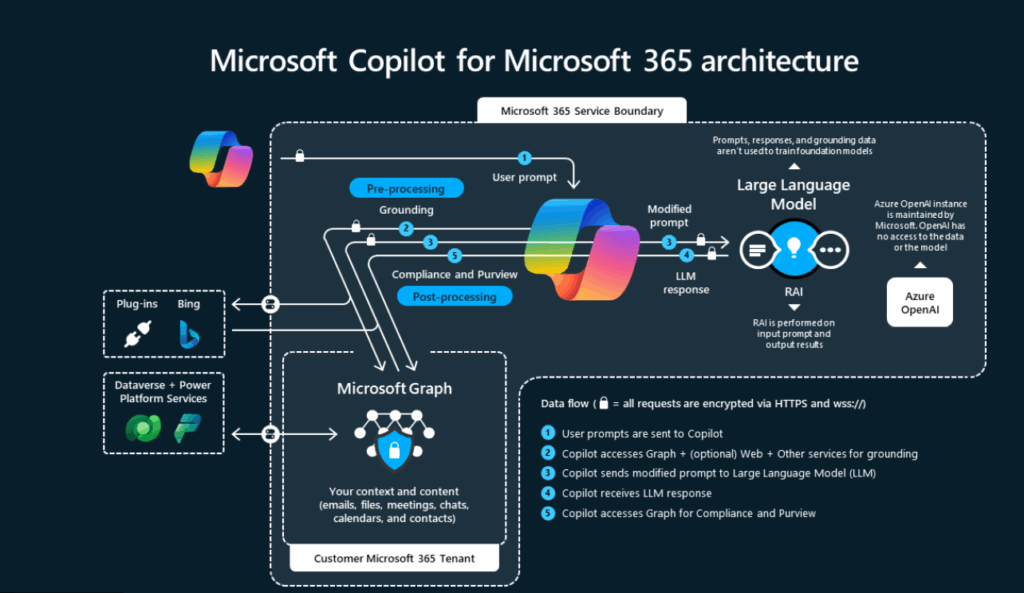
Introduction: Why Architecture Matters for Copilot
Most AI tools feel like a black box:
- You type something
- You get an answer
- You don’t know why or how
Microsoft Copilot is different.
Because it is used inside business-critical systems, Microsoft had to design Copilot with:
- Strong security boundaries
- Permission-aware intelligence
- Compliance by default
- Human-in-control workflows
Understanding the architecture helps you:
- Trust Copilot’s outputs
- Design better prompts
- Implement governance
- Explain Copilot to leadership
- Build solutions on top of it
High-Level View: Copilot Architecture in One Sentence
Microsoft Copilot combines user intent, organizational context, AI models, and enterprise security controls to generate helpful responses inside Microsoft applications.
Now let’s break that down step by step.


The 6 Core Layers of Microsoft Copilot Architecture
Think of Copilot as a layered system, not a single AI model.
User
 ↓
Prompt Understanding
 ↓
Context & Permissions (Microsoft Graph)
 ↓
AI Orchestration Layer
 ↓
Security & Compliance Controls
 ↓
Application Output
Each layer has a specific responsibility.
Layer 1: User Interaction Layer (Where Everything Starts)
This is the front door of Copilot.
What Happens Here
- User types a prompt in natural language
- Prompt is submitted inside an app (Word, Excel, Teams, etc.)
- No technical syntax required
Real-World Example
A project manager types in Teams:
“Summarize today’s meeting and list action items.”
At this point:
- Copilot does not guess
- Copilot does not search the entire company
- Copilot waits for context and permission checks
Layer 2: Prompt Understanding & Intent Detection
Copilot doesn’t just read words—it interprets intent.
What Copilot Analyzes
- Is the user asking to summarize, create, analyze, or explain?
- Which format is expected? (text, table, list, slide)
- Which application context applies?
Why This Matters
The same prompt behaves differently in different apps.
Example:
- In Word → document content
- In Excel → data analysis
- In Teams → meetings and chats
This keeps Copilot context-aware, not generic.
Layer 3: Microsoft Graph (Context & Permissions Engine)
This is the most critical layer of Copilot architecture.
What Is Microsoft Graph in Simple Terms?
Microsoft Graph is a secure map of your work world:
- Documents you can access
- Emails you are allowed to read
- Meetings you attended
- Files you own or collaborate on
Copilot uses Graph to answer:
“What data is relevant—and allowed—for this user?”
Key Rule
Copilot can only see what you can see.
Real-World Example
If User asks Copilot:
“Summarize my Azure architecture notes”
Copilot:
- Can access User’s OneDrive files
- Cannot access another team’s restricted folder
- Cannot bypass permissions
This makes Copilot permission-respecting by design.
Layer 4: AI Orchestration Layer (The Brain, Not the Memory)
This layer connects:
- User intent
- Context from Microsoft Graph
- AI models
Important Clarification
Copilot is not just a chatbot.
It uses orchestration, which means:
- Selecting the right model
- Applying safety filters
- Structuring prompts
- Formatting output
Why Orchestration Matters
Without orchestration:
- AI responses would be random
- Security risks would increase
- Output would not fit the app
Orchestration ensures:
- Consistent behavior
- Enterprise reliability
- Predictable responses
Layer 5: Large Language Models (LLMs)
This is the generation engine, not the controller.
What LLMs Do
- Understand language
- Generate text, summaries, explanations
- Follow structured instructions
What LLMs Do NOT Do
- They do not store customer data
- They do not remember your files
- They do not decide permissions
Enterprise Safety Principle
Customer data:
- Is not used to train foundation models
- Is processed securely
- Stays within Microsoft’s compliance boundaries
This separation is intentional and critical.
Layer 6: Security, Compliance, and Responsible AI Controls
This layer protects organizations.
Controls Applied Here
- Data loss prevention
- Sensitivity labels
- Compliance policies
- Audit logging
- Responsible AI filters
Real-World Scenario
If a user asks:
“Summarize confidential HR files”
Copilot checks:
- Is the user authorized?
- Is the data classified?
- Are there policy restrictions?
If rules fail → Copilot refuses or limits output.
Layer 7: Application Output Layer
Finally, Copilot returns results inside the app.
Examples
- Word → rewritten paragraph
- Excel → insights or formulas
- PowerPoint → slides
- Teams → meeting recap
Human Control Is Always Present
Users can:
- Edit output
- Regenerate
- Reject entirely
Copilot assists, it does not act autonomously.
End-to-End Architecture Flow (Simple Walkthrough)
Let’s walk through a real scenario.
Scenario: Finance Manager in Excel
- User types:
“Analyze last quarter revenue trends.” - Copilot identifies:
- Intent: Analysis
- App: Excel
- Microsoft Graph:
- Identifies allowed spreadsheet
- Confirms user access
- AI orchestration:
- Formats structured prompt
- Applies security rules
- LLM:
- Generates insights
- Output:
- Appears as charts and explanations
All within seconds, securely.
Why This Architecture Works at Enterprise Scale
Microsoft Copilot succeeds because:
- AI is not directly connected to raw data
- Permissions are enforced before generation
- Output is scoped to application context
- Humans remain accountable
This is why Copilot is trusted in:
- Finance
- Healthcare
- Government
- Large enterprises
Common Architecture Misunderstandings
❌ “Copilot searches the entire organization”
Reality: It only sees permitted context.
❌ “Copilot stores company data”
Reality: Data is processed, not retained for training.
❌ “Copilot makes decisions”
Reality: It provides suggestions, not authority.
Architecture Best Practices for Organizations
- Define clear access controls
- Label sensitive data
- Train users on responsible prompting
- Monitor Copilot usage
- Start with limited rollout
How User Uses This Architecture Knowledge
User applies Copilot architecture principles to:
- Write accurate tutorials
- Validate AI outputs
- Avoid hallucinations
- Preserve original voice
Understanding architecture makes AI usage intentional, not blind.
Safe Content Automation (Without Losing Human Value)
AI can help you scale content—but architecture thinking matters here too.
User’s Automation Framework
- Human defines structure and goal
- AI assists with explanations
- Human adds:
- Real examples
- Clarifications
- Tone and flow
- Manual review and refinement
Why This Works
- AI assists, not replaces
- Content stays original
- Voice remains human
- Quality stays consistent
This mirrors Copilot’s own philosophy:
Human-led, AI-assisted
Future Direction of Copilot Architecture
Microsoft is expanding:
- Multi-agent orchestration
- Deeper app awareness
- Industry-specific copilots
- Stronger governance tooling
But the core architecture principles will remain the same:
- Security first
- Context aware
- Human in control
Key Takeaways
- Microsoft Copilot is a layered system, not a chatbot
- Microsoft Graph enforces permissions
- AI models generate—but do not govern
- Security controls protect every step
- Architecture enables trust at scale
Final Thoughts
Understanding Microsoft Copilot architecture helps you:
- Use Copilot more effectively
- Explain it confidently to others
- Design secure AI solutions
- Build better tutorials and systems
For professionals like Manish, architecture knowledge transforms Copilot from a tool into a reliable productivity partner.
Next Recommended Reading
- Copilot in Microsoft 365
- Copilot Security and Governance
- Prompt Engineering for Copilot
- Copilot vs Traditional Automation
- What Is Microsoft Copilot and How It Works?